

Keeping Two Gitea Repos in Sync (Work → Personal) Without Making It Complicated
Keeping Two Gitea Repos in Sync (Work → Personal) Without Making It Complicated
I wanted a simple way to keep a personal backup of a repository hosted on my employer’s work Gitea, while still being able to do occasional work from home.
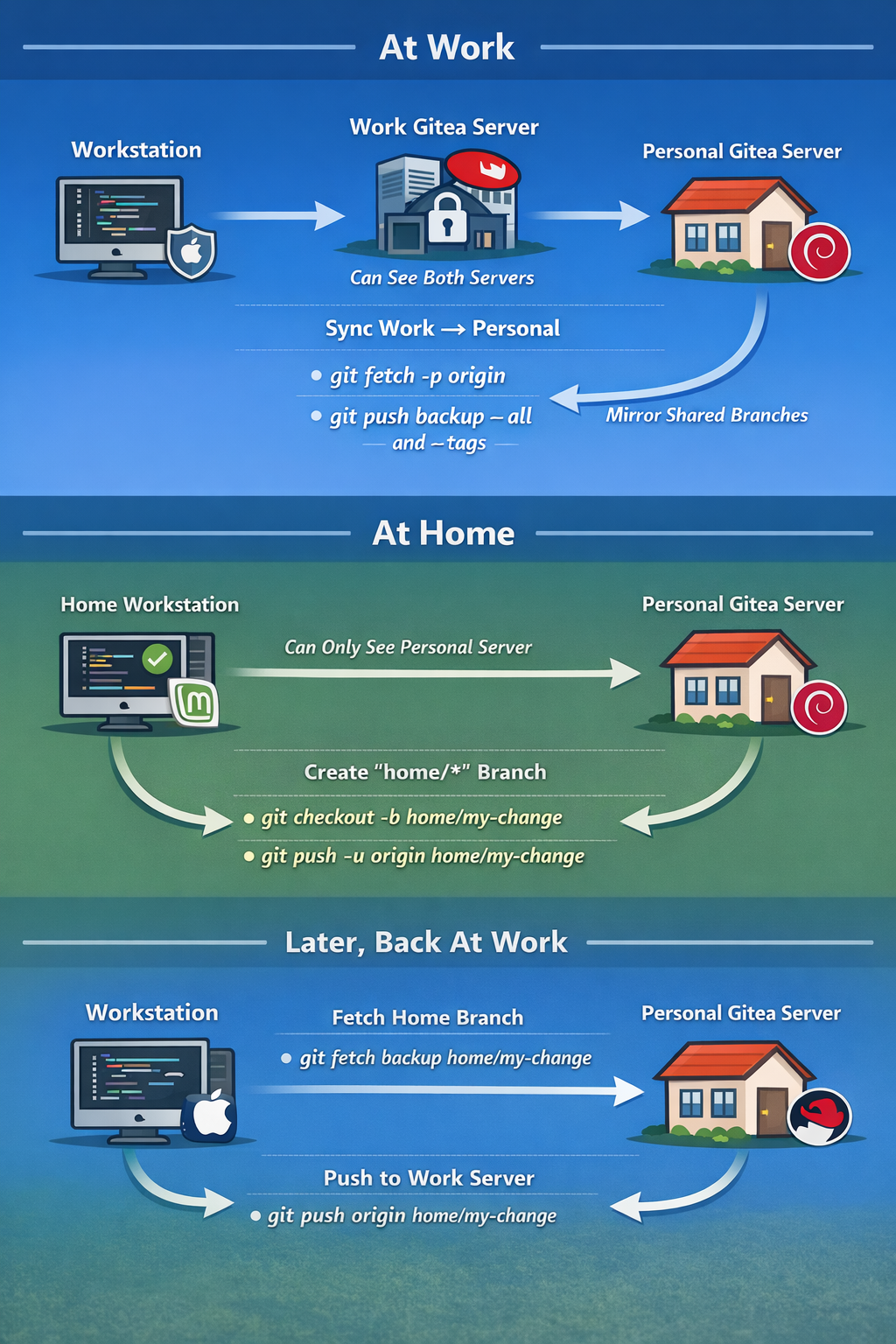
The constraint: my networks are firewalled.
- On my work workstation (Mac), I can reach both servers:
- Work Gitea server (RHEL)
- Personal Gitea server (Debian)
- On my home workstation (Linux Mint), I can only reach personal Gitea.
So I use the work workstation as the go-between.
The guiding rule
Work Gitea is the source of truth for shared branches (like main).
Personal Gitea is:
- a backup mirror of the work repo, and
- a place to park “home-only” branches until I’m back on the VPN.
1) At work: sync Work → Personal (backup)
On the work workstation, I keep a bare mirror clone and push updates to my personal Gitea.
The basic idea is:
git fetch -p origin
git push backup --all
git push backup --tags
origin= the work Gitea repo (RHEL)backup= the personal Gitea repo (Debian)
I can run this manually, or on a schedule, to keep my personal server up to date with branches + tags.
Important: I avoid git push --mirror here because I sometimes create home-only branches on the personal repo. --mirror can delete branches on the destination, which is not what I want.
2) At home: commit on a “home/*” branch
At home, I work normally, but I never commit directly to main on the personal server. Instead I create a clearly-named branch:
git checkout -b home/my-change
git push -u origin home/my-change
This keeps it obvious which branches are “home work in progress” versus the shared mainline.
3) Later, back at work: bring the home branch into Work Gitea
When I’m back on the work workstation (where I can reach both servers again), I pull that home branch from my personal repo and push it into the work repo:
git fetch backup home/my-change:home/my-change
git push origin home/my-change:home/my-change
From there I can open a PR on the work Gitea server and merge it like normal.
Why this workflow works
- Simple: only two remotes (
originandbackup) and a few commands. - Safe:
mainstays canonical on the work server. - Flexible: I can still do real work from home without needing access to the work network.
- Auditable: the
home/*naming makes it obvious what originated outside the work network.
That’s it—one repo, two Gitea servers, and no drama.
Fresh-start checklist (reset workstation repo before new work)
Before starting a new task, I reset my scratch branch to match main:
git checkout main
git pull --ff-only origin main

git checkout home/my-change
git reset --hard main
git push --force-with-lease origin home/my-change
Now home/my-change is a clean copy of main, ready for new commits.
(Only do this on a personal scratch branch—this rewrites branch history.)
--- Home → Work merge (run on WORK workstation that can reach both servers) ---
1) Refresh your local scratch branch from your HOME/PERSONAL Gitea (remote: backup)
git checkout home/my-change
git fetch backup home/my-change
git reset --hard backup/home/my-change
2) Merge refreshed scratch branch into WORK main (remote: origin) and push
git checkout main.
git pull --ff-only origin main
git merge --no-ff home/my-change
git push origin main
(optional) Cleanup: delete the scratch branch locally and on work server
git branch -d home/my-change
git push origin --delete home/my-change